Introduction
This blog post explains the technical implementation of cross-account Amazon S3 replication using Terraform, based on my miniature-enigma GitHub repository.
Overview
This is a proof-of-concept for setting up a secure and automated replication of S3 objects from a source bucket in one AWS account to a destination bucket in a separate AWS account. This is useful for disaster recovery, data aggregation, or regulatory compliance. The project leverages Terraform, an infrastructure-as-code tool, to define the necessary AWS resources. It assumes that a bucket has already been created in the source and destination accounts.
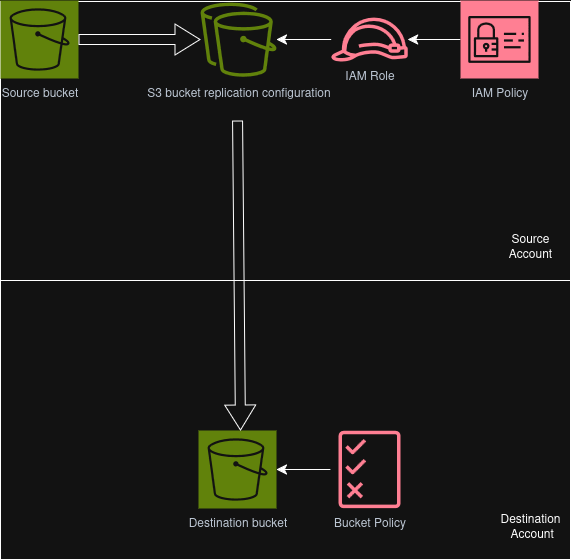
How It Works
The code is based around the aws_s3_bucket_replication_configuration resource. This Terraform resource configures the replication rules on the source bucket, including the IAM role and policy, directing objects to the destination bucket. A bucket policy in the destination account allows the replication role access to the S3 bucket.
Source Account Resources
- IAM Role s3-replication-configuration
- IAM Policy s3-replication
- S3 Bucket Replication Configuration referencing the source and destination buckets
Destination Account Resources
- S3 Bucket Policy on the destination account bucket
Here is a breakdown of the technical steps:
-
Configuration: The project uses
terraform.tfvarsfile to manage variables, including the AWS account IDs and S3 bucket names for both the source and destination. This file allows for easy customization without modifying the core Terraform code. -
Versioning: Object versioning must be enabled on the source bucket. This is a prerequisite for S3 replication, as it allows AWS to track changes and replicate new versions of objects.
-
Terraform Initialization and Planning: The standard Terraform workflow is followed in both accounts. The tofu init command initializes the working directory, downloading necessary provider plugins. The tofu plan command creates an execution plan, showing what resources Terraform will create, modify, or destroy.
-
Resource Application: The tofu apply command executes the plan, creating the S3 buckets and configuring the replication rules. A key part of the setup involves resetting the Terraform state file from the source and destination accounts to apply the configuration in both environments. It is assumed that there is no trust relationship between the two accounts.
-
Replication in Action: Once the setup is complete, any file copied to the source bucket is automatically replicated to the destination bucket, demonstrating a successful cross-account replication pipeline.
By using this approach, the project automates the creation of the replication rules, bucket policies, and IAM roles required for S3 replication, providing a clear and repeatable process for building robust data pipelines.